You’ve got two buildings, a road or a car park between them, and a quote for digging that makes the whole project look silly. A wireless link between the roofs is the obvious alternative, and it can work well. It can also go wrong for reasons that have nothing to do with the kit you bought, so it pays to think about the path, the rules and the failure before anyone climbs a ladder.
When a wireless link is the sensible answer
Fibre or a leased line is the better answer when you can get it at a sensible price. It doesn’t need a clear view and it isn’t bothered by rain. Its capacity is set by the circuit rather than by the weather and the neighbours’ radios. A wireless link earns its place where you can’t dig, where you don’t own the land in between, where the work has to be finished soon or where the buildings will only be occupied for a while.
Four questions settle most of it. How much capacity do you need on day one and in three years? How much does an outage hurt the people on the far side? Can you get a clear path? And who will look after the radios once they’re on the roof? If the answers are “a lot”, “badly” and “not sure”, price the fibre properly before you fall for the cheaper-looking option.
Line of sight is a tube, not a line
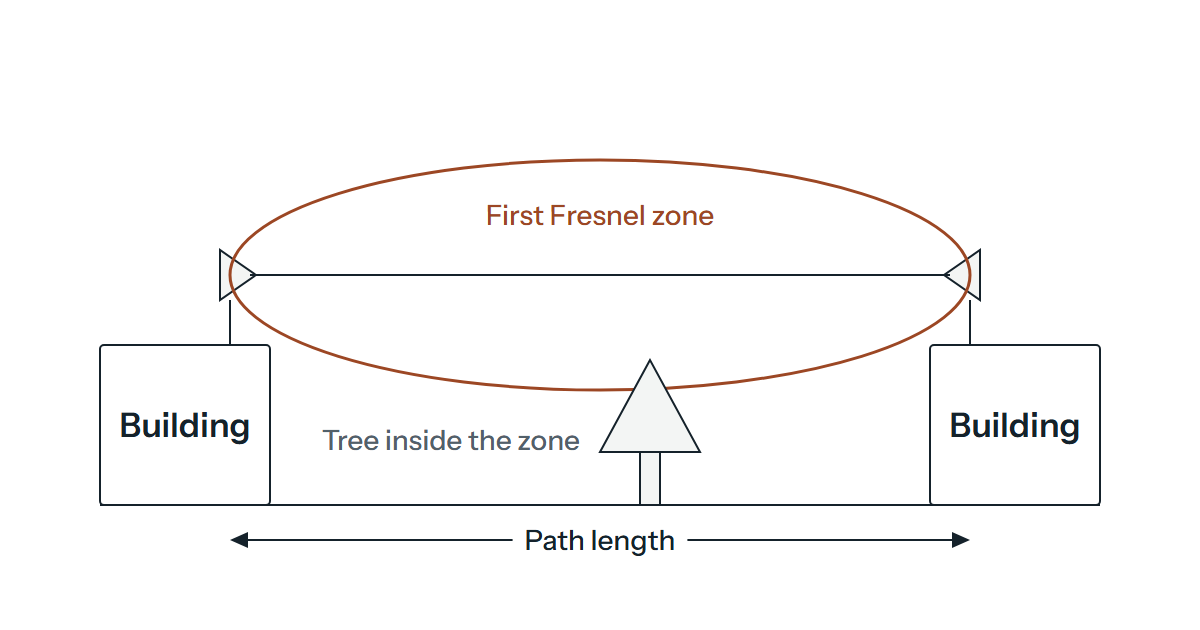
You can see the other building, so the path must be fine? Not necessarily. Radio doesn’t travel along a thin line; it needs a space around that line, called the first Fresnel zone. ITU-R Recommendation P.526 treats a path as line of sight, for practical purposes, when nothing sits inside the first Fresnel ellipsoid, and its method for obstructed paths starts where clearance falls to 60% of the first zone’s radius. We’d take that 60% as a floor and not a target.
The radius at any point is given by the ITU’s practical formula:
R1 = 550 × √( d1 × d2 / ((d1 + d2) × f) )
where R1 is in metres, d1 and d2 are the distances in kilometres from each end to the point you’re checking, and f is the frequency in MHz. The widest part is the middle of the path, where d1 and d2 are equal.
The paths and the 5,500 MHz frequency below are illustrations, not a recommendation.
| Path length | First zone radius at the middle | 60% of that radius |
|---|---|---|
| 1 km | 3.7 m | 2.2 m |
| 2 km | 5.2 m | 3.1 m |
| 5 km | 8.3 m | 5.0 m |
The point to take from the table is the size. On a 2 km path the zone is more than ten metres across at its widest, so a roof edge, a chimney stack or a tree that looks well clear of the line can still be inside it. Trees also grow and come into leaf, which means a winter survey can flatter a path that will be marginal by summer. Walk the path, look at the middle third and ask whoever surveys it to show you the clearance.
Mounting and alignment
A dish with a narrow beam has to point at the other dish and keep pointing there, which makes the mount matter more than you’d expect. A pole that flexes in the wind, a bracket on a parapet that moves or a chimney that nobody owns can all drift the beam off target over weeks. Choose a rigid mount that the roof’s owner has agreed to and plan safe access for later. Work at height has its own safety rules, so leave the climbing to people equipped for it.
Alignment is done with the equipment’s own signal indicators and a careful hand, one end at a time, and then checked with a real data transfer in both directions. Write the final signal figures down so you can spot slow drift later.
What limits throughput in practice
The speed on the box is a best-case radio rate. What you get depends on the signal arriving at the far end, the noise around it, the channel width and whether the radios have had to fall back to slower modulation as the signal weakens. Distance matters mainly because it eats signal. Ask the supplier for the throughput they expect over your actual path, and test with a sustained transfer once it’s fitted, since a ping test proves little about capacity.
Think about what has to cross it, too. Backups and file copies between sites can fill a link that copes well with email and web traffic, and voice is more sensitive to loss and delay than to raw capacity.
Rain, ice, wind and neighbours
Rain can reduce the signal, ice or snow on a dish can change how it behaves and wind can move a poorly fixed mount. Whatever the frequency, we’d want a margin in the design so that a poor day doesn’t take the link down.
Interference is the less obvious problem. Licence-exempt bands are shared with other users, including the Wi-Fi in nearby buildings, so a link that was quiet at survey can become noisy when someone else installs equipment. A spectrum check before choosing a channel helps. If you’re planning the Wi-Fi inside the buildings at the same time, choosing the right Wi-Fi solution covers that side, which is a separate job from the link.
What the UK rules say about outdoor 5 GHz links
This matters before you order anything, because a band that suits one kind of device can be closed to another. As at March 2025 the interface requirement Ofcom publishes for licence-exempt short range devices is IR 2030 (January 2025 copy), published on 23 March 2023. It says no radio equipment may be installed or used in the UK except under a licence or an exemption made by Ofcom, and that the equipment must meet its requirements.
For wireless access systems in the 5 GHz range the entries differ band by band. For 5150 to 5250 MHz, outdoor use is permitted provided the equipment is not part of a fixed outdoor installation. For 5250 to 5350 MHz, use is limited to a building or similar enclosed space. For 5725 to 5850 MHz, equipment must not form part of a fixed outdoors installation when operating between 5730 and 5850 MHz. We couldn’t confirm from Ofcom whether a point-to-point link counts as a wireless access system. If it does, we’d treat a link between two roofs as a fixed outdoor installation, which puts those three bands out of reach and leaves 5470 to 5730 MHz as the one to check with your supplier.
As we read the IR 2030 table, that entry has no indoor-only or fixed-outdoor restriction. It sets a maximum mean e.i.r.p. (equivalent isotropically radiated power, which includes antenna gain) of 1 W with 50 mW per MHz, and it requires techniques to share the spectrum, including dynamic frequency selection and transmit power control. In practice that means a radio in that range may have to change channel, so ask your supplier how theirs behave when it happens. The entry is written for wireless access systems and doesn’t tell us whether a point-to-point link may use the band without a licence, so that needs confirming with your supplier and Ofcom.
Separately, Ofcom’s page on fixed wireless access in the 5725 to 5850 MHz band, published on 16 March 2023, describes a 5.8 GHz licence for point-to-multipoint equipment, with a light-licensing regime that needs a minimum payment and registration. It doesn’t say whether a single building-to-building link needs one. Ask your supplier to state in writing which band, power setting and permission the link will use, and confirm it with Ofcom before you buy.
Locking the radios down
A point-to-point radio is a network device that sits on a roof and talks through the air, so treat it like a switch in a cupboard anyone can walk into. Change the factory credentials before the radios are mounted, and use the strongest encryption the equipment offers on the link itself, so that the traffic isn’t readable by anyone who happens to point a receiver at it. Keep the management interface off your user network, reachable only from a small management VLAN or a named administration machine, and certainly not from the internet.
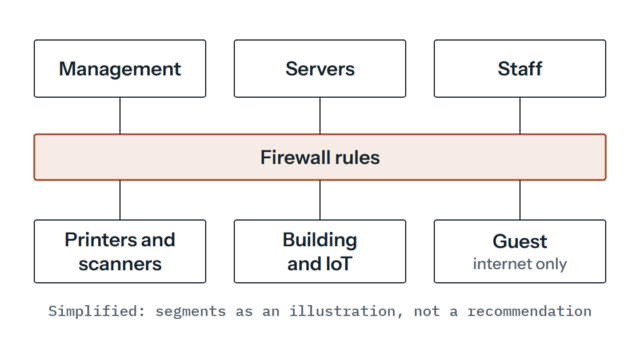
Then look after them. Firmware needs updating and the configuration needs backing up, which belongs in your regular network maintenance, and don’t treat the link as trusted because it’s yours. Put a firewall rule set at each end as you would for any connection between sites.
Power, lightning and earthing
Many link radios are powered over the Ethernet cable from the building end, so check what the radio needs against what the switch or injector supplies, and what the cable run does to that. Use outdoor-rated cable and seal the connectors.
A metal pole on a roof is the highest thing around, and a cable leads from it into your equipment room. Surge protection at the entry point and proper earthing are there to reduce the risk from a strike or a nearby surge, and the right arrangement depends on the building and any lightning protection already fitted. We’d leave the design and the check of the earthing to a competent electrician or lightning protection specialist, and ask them to look at the whole installation.
Permission and a plan B
Before you buy, ask the local planning authority whether the antennas or a mast need permission, and tell your landlord if you rent. Listed buildings, conservation areas and leases can change the answer, and we can’t give legal advice on it. It costs little to ask early and a lot to get wrong once the dish is up.
Then plan for the day the link is down. A single link is a single point of failure, whether it’s a radio fault, a power cut at one end or a lorry reversing into the mast. The question is how much a failure hurts, and that decides what’s proportionate. For some sites a plain broadband line and a VPN as a backup path is enough, and for others a second link on a different route or frequency makes sense. Either way, something should alert a person when the link drops. We look at single points of failure as part of network design and care, and the earlier you ask the question the cheaper the answer.
A sketch of the two sites, the distance between them and what has to cross the link is enough to start with, and if you’d like another opinion before you order any kit, send it over and we’ll take a look.