Picture a visitor’s laptop plugged into a meeting-room socket, where it lands on the same network as your file server, your door controller and the accounts workstation. Nobody meant that to happen, but it’s what a network does when every port and every Wi-Fi name has been given the same addresses and the same rules, which is how many networks start life and how some of them stay.
Segmentation is the cure, and it’s often sold as a VLAN project when the VLANs are the easy part. The harder part is deciding what’s allowed to talk to what, writing it down and testing it before people notice something has stopped working. That’s the order we’d work in when we’re helping with network design, installation and troubleshooting, and it’s the order of what follows.
Why bother splitting the network up
The NCSC’s guidance on preventing lateral movement puts the case plainly. Splitting a network into segments greatly increases the difficulty for an attacker who has got in, because their point of entry may not have any means of reaching the target data or system. Systems that don’t need to communicate belong in different segments, and traffic originating inside the network boundary shouldn’t be trusted automatically. It’s written for large organisations, but the principle scales down.
There are everyday reasons too. A misbehaving device affects its own segment instead of everything. Guest and unmanaged devices, such as visitors’ phones or a display nobody patches, stay away from the things you care about. And traffic between segments passes through a point where you can log it, which the NCSC page also notes: segmenting gives you focal points of traffic flow to monitor.
Decide what goes where before you touch a switch
Make a list of the kinds of thing on the network, then ask of each what needs to reach it, what it needs to reach and what happens if it’s compromised. The answers draw the boundaries better than any template.
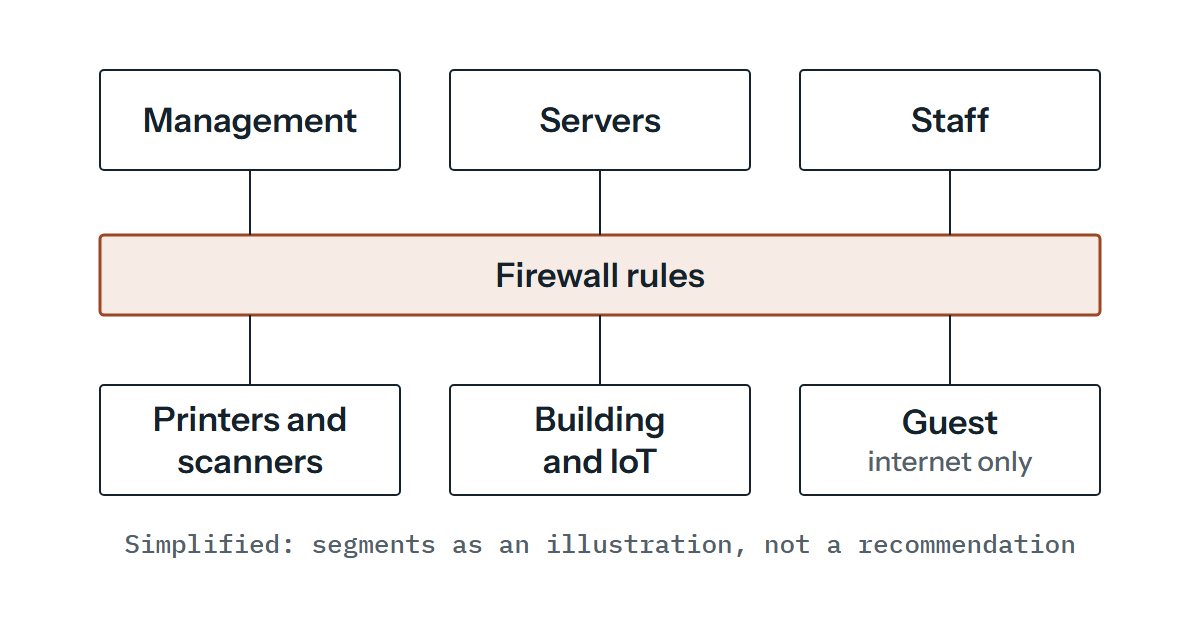
For many organisations that lands on something like the set below. The VLAN numbers are made up for illustration, not a recommendation, and you’d add or drop rows to suit you (voice phones and staff-owned devices can earn a segment of their own).
| Segment | Illustrative VLAN ID | What lives there | What it needs to reach |
|---|---|---|---|
| Management | 10 | Switch, firewall and access point management interfaces | Logging and time services, administrators’ workstations |
| Servers | 20 | File, application and directory servers | Internal DNS, updates through the firewall, backup and monitoring tools |
| Staff | 30 | Managed laptops and desktops | Servers, print services, internal DNS and DHCP, the internet |
| Printers and scanners | 40 | Network printers and scanners | The print server or staff devices on printing ports, scan destinations |
| Building and IoT | 50 | Cameras, door controllers, heating controls, displays | Their own controller or cloud service, and little else |
| Guest | 90 | Visitors’ and unmanaged devices | A public or filtering resolver, and the internet |
The table is a list of permitted flows, and anything not on it gets blocked between segments by default. If a row holds a flow you can’t justify, the thing may be in the wrong segment. Start with fewer segments than you think you need, because each one brings its own range, DHCP scope and rules.
What a VLAN is, and where it goes wrong
In general terms, a VLAN makes one physical switch behave as several separate layer 2 networks, so devices in different VLANs can’t talk to each other directly at that layer. The standard that covers it is IEEE 802.1Q, whose 2022 edition describes the operation of MAC bridges and VLAN bridges.
An access port carries one VLAN, and the device plugged into it knows nothing about VLANs. A trunk port carries several and marks each frame with a tag saying which VLAN it belongs to, which is how one cable between two switches, or between a switch and an access point or firewall, can serve every segment. Frames that arrive on a trunk without a tag are placed in a single VLAN, called the native VLAN on many products.
That’s where the trouble tends to start. If the two ends of a trunk disagree about the native VLAN, untagged traffic can end up in the wrong segment or be dropped. Defaults differ between vendors, so test this on your own equipment. We prefer a native VLAN that’s unused and has nothing in it, only the VLANs each trunk needs allowed on it, and both ends checked.
The bigger point is that we wouldn’t rely on a VLAN alone as a security boundary. It separates traffic at layer 2. The moment something routes between VLANs, and something has to, whatever does the routing decides what crosses. If a layer 3 switch routes everything between everything, you have several networks that are all open to each other.
The rules between segments are the control
Decide where the routing between segments happens and put your rules there. That might be the firewall, with each VLAN presented to it as its own interface, or a layer 3 switch with access lists and the firewall left at the edge. We’d lean towards the firewall for anything carrying real policy, because it’s often the device that logs well and the first place you look when something doesn’t work. For simple separations a layer 3 switch with a sensible access list will do.
Either way, write the rules from the table above (these are examples only): deny by default between segments, then allow named flows on named ports. Staff to servers on the ports the applications use. Staff to the print server. Servers to the internet for updates. Each segment to its own DNS and DHCP service only: staff and servers to the internal resolvers, and guests to a public or filtering resolver on the internet side, with no route to internal DNS or to the DHCP server. Nothing into management except from administrators’ workstations. Keep the list short enough to read in an afternoon, and put a comment against each rule saying why it exists, because that’s the first question in six months.
Addresses, DHCP and DNS for each segment
Give each segment its own address range. RFC 1918 reserves 10/8, 172.16/12 and 192.168/16 for private use without asking anyone, and warns that private space can mean renumbering when separate private networks merge, because addresses that were unique in each may clash. So check your ranges against any site-to-site VPN, partner connection or organisation you might one day merge with. A pattern helps whoever reads the plan later, for example 10.<site>.<VLAN number>.0/24. It’s a placeholder pattern that only works while VLAN numbers stay small, not a design.
DHCP then has to reach every segment. A client starts by broadcasting on its own subnet, and broadcasts don’t cross a router, so each segment needs its own server or a relay agent. RFC 2131 defines a relay agent as a host or router that passes DHCP messages between clients and servers (section 1.5), and describes relay agents passing a client’s DHCPREQUEST to servers not on the same subnet (section 3.2). We’d expect the server to have to hand out a scope that matches the segment the request came from, so check that’s what happens before you rely on it.
The options matter as much as the addresses. RFC 2132 defines the router option (the gateway on the client’s subnet) and the DNS server option, so each scope should hand out its own gateway and the DNS servers suited to that segment. A wrong gateway on a scope is a good first thing to look at in testing.
Guest Wi-Fi
We’d normally map a separate wireless network name to the guest VLAN, carry that VLAN on the trunk to the access points and let the firewall allow nothing but the internet from it. Your Wi-Fi solution needs to support this, which is worth checking before you buy.
Many access points can stop guests talking to each other, and the setting is named and behaves differently between products, so check yours. On the firewall, make sure guests can’t reach management interfaces by accident. It’s easy to miss when a rule says “allow guest to the DNS server” and the DNS server is yours.
Printers, discovery and other things that stop working
Printing is where segmentation projects get noticed, and discovery is a common reason. Printers are often found through multicast DNS. RFC 6762 (section 3) says names ending in .local are link-local, meaningful only on the link where they originate, and that queries for them go to a link-local multicast address (224.0.0.251 for IPv4). Routers won’t normally carry that between VLANs, so a laptop in the staff VLAN won’t find a printer in the printer VLAN this way unless something is set up to relay it. Other discovery protocols can behave similarly, so test each one.
There are three ways round it. Add the printer by IP address or through a print server, which makes discovery irrelevant. Put the print server in the servers segment and let staff reach only that. Or, where discovery must cross segments, look at whether your firewall or switches offer a gateway for it, and treat that as a documented exception. Give printers fixed addresses or DHCP reservations so the printing rule keeps pointing at the right device.
Rolling out and proving it works
Move one segment at a time, starting with the one that matters least to get wrong. Guest is a good candidate, because nothing business-critical depends on it. Back up switch and firewall configurations first, as in the routine network checks we’d suggest anyway, and agree a change window and a way back before anyone moves a port.
Before the deny rules go live, consider a period of broad rules with logging, so you can see which flows happen. It catches the application nobody told you about. Then tighten.
Test from each segment as if you were a device that lives there. Does it get an address, the right gateway and DNS? Can it reach what it should? Equally important, can it not reach what it shouldn’t? Try the management interfaces, the servers and another segment’s printer from the guest network, and expect each to fail. Record every result, and keep the flow table, the diagram and the rule list together and updated. An undocumented scheme can drift back to a flat network one exception at a time.
The plan on paper is the cheapest place to find mistakes, well before anyone touches a trunk port. If you’d like a second pair of eyes on it, send us your segment list and the flows you expect between them and we’d be glad to read it through with you.