The ticket says the network keeps dropping. Ask when and you hear “a few times a week”, ask who and it’s “some of us”, and by the time anyone gets to a switch everything is working perfectly. That’s what makes intermittent faults so tiresome. The evidence only exists while the fault does, and a change that happened to coincide with a quiet afternoon looks exactly like a cure.
What follows is the method we’d bring to troubleshooting wired and wireless networks. It improves your chances of finding a cause and stops you changing six things at once, but it can’t promise a result. What it does depend on is the fault being described properly before anyone touches anything.
Describe the fault before you touch anything
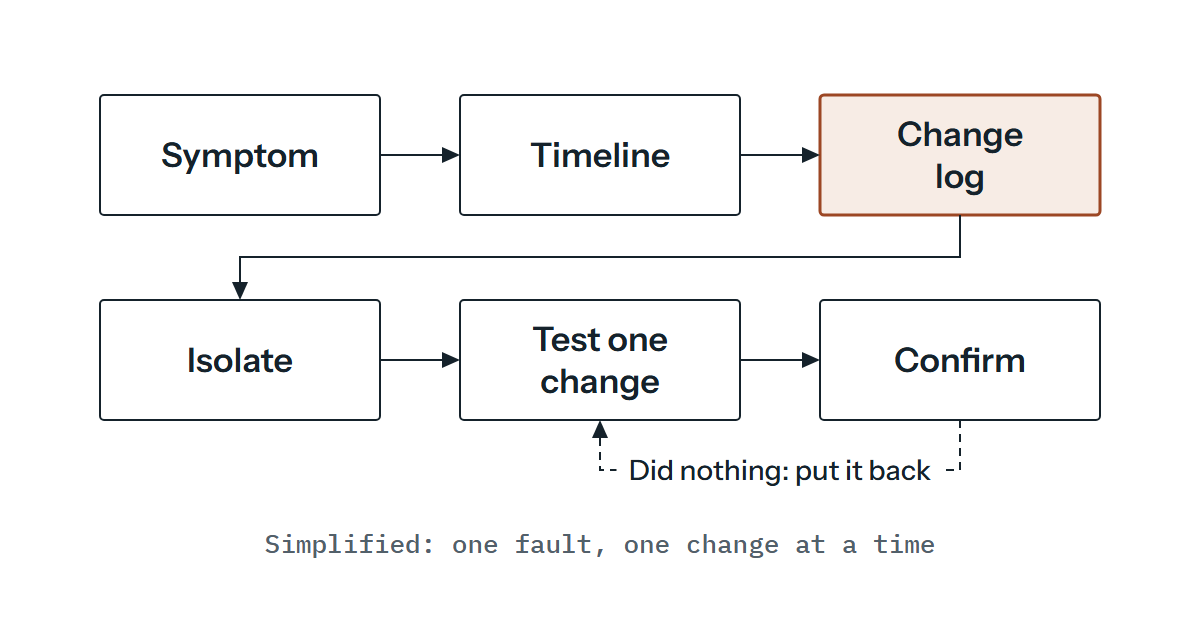
Write down who is affected, what they lose, where they sit, when it started and how often it happens, and mark which of those you know and which you’re guessing. “The network is slow” can’t be tested. “Three people on the second floor lose a file share for about 40 seconds, several times a day, and the wired desks next to them don’t notice” can. (That second description is an invented illustration, there to show the shape.)
The useful part is the comparison. Whatever the affected users share and the unaffected ones don’t is where you look first: the same switch, VLAN, access point, uplink, DHCP scope or server. Note what the fault is not, too. If it never touches wired devices, you’ve set aside a good deal of the core.
Time matters as much as place. Faults that recur at regular intervals point towards something with a timer, such as a lease, a scheduled job or a backup window, while faults with no pattern lean towards the physical layer or interference. It’s a quick way to rank suspects.
Ask what changed, including the changes nobody logged
Many intermittent faults start at a change: a firmware upgrade, a new device, a cable that was moved, power work in a comms room, a firewall policy edit. Start with the change records, then ask the people who don’t write things down, because the change that matters is often the small one. If you keep baseline readings from routine monthly checks, you’ll have something to compare against. Compare the date the fault was first noticed with the change log, and allow for a cause that sat quietly for days before anything tripped over it.
DHCP is worth a separate look because it creates behaviour on a timer. RFC 2131 (section 3.7) says a client that cannot reach a DHCP server may keep using its previous address until the lease runs out, and must stop at once if the lease expires first. Before that it tries to renew with its original server and then any server, by default at half and seven-eighths of the lease (section 4.4.5), and a client that receives a DHCPNAK restarts configuration. So a drop that recurs around renewal time or at lease expiry, or began after a scope change or a server move, is one we’d check against the lease settings before anything more exotic.
Duplicate addresses are the other classic. ARP, defined in RFC 826, keeps a table of hardware addresses against IP addresses, and when an ARP packet arrives from a known IP address with a different hardware address, the new one supersedes the old. If two devices claim one address, who receives the traffic can flip back and forth, which fits the remark in RFC 5227 that ignoring conflicting ARP packets results in seemingly random network failures. That RFC describes how a host can detect a conflict, and it lets the host stop using the address, defend it once or, if configured to, defend it indefinitely. Behaviour varies by implementation, so a host log that mentions a conflict deserves a proper read.
A few other causes are worth keeping in mind. Duplex or speed mismatches, failing optics and an exceeded PoE budget are all worth checking when a link or a device drops in and out, and an uplink that saturates at certain hours is a lead worth following for slowness that follows the working day. The rest, from spanning tree reconvergence to a slow DNS server or interference, are for the measuring and path-splitting below to find. If the trouble is wireless only, our piece on choosing a Wi-Fi solution covers the planning side that interference and roaming problems can trace back to.
Measure before you guess
Counters turn “it feels worse” into numbers, as long as you read them in a comparable way. The table sets out four readings that are standardised in vendor-neutral MIBs, what each can tell you and the catch.
| Reading | What it can tell you | The catch |
|---|---|---|
| Time of last interface state change (RFC 2863) | Whether a link genuinely went down and when, to match against user reports | It’s a sysUpTime reading, so convert it to a clock time, and it records the last change only, so poll it or collect logs to catch each one |
| Input errors against discards (RFC 2863) | Errors mean damaged packets. Discards are packets dropped although no error was detected, and the RFC gives freeing buffer space as one possible reason, so a rising discard count is consistent with congestion | Check outbound discards as well as inbound; which one rises is a pointer, not a diagnosis |
| Frame check sequence and alignment errors, late collisions, duplex status (RFC 3635) | Damaged frames suggest cabling, optics or a mismatch. RFC 3635 says late collisions don’t count on an interface running full duplex, so a rising count means that interface is running half duplex; if you meant it to be full, suspect a duplex mismatch | A “duplex status” of unknown means it couldn’t be determined |
| Spanning tree topology changes and time since the last one (RFC 4188) | Whether the topology is being disturbed in step with the fault | The counter resets when the management entity restarts, and you’ll need your vendor’s documentation to learn what a change does on your switches |
Take readings before and after a test and compare the difference, not the absolute value. RFC 2863 gives an example worth remembering: at full line rate on 1Gbps, a 32-bit octet counter can wrap in as little as 34 seconds, so a slow poll can miss a wrap entirely. It also says a management application should discard any difference where the counter discontinuity time changed between polls. In short, ignore deltas that straddle a reset.
None of this lines up unless the clocks do. The syslog specification, RFC 5424, defines a timestamp with fractional seconds where the clock allows, and a nil value where the device can’t obtain the time. Some devices may send a shorter timestamp, so check what yours sends. Keep every device on a common time source such as NTP, and check that before you trust any sequence of events across devices. Syslog often travels over UDP, and RFC 5424 notes that some messages may then be lost, so a missing line proves less than you’d hope.
Test from both ends and split the path
A capture on one side tells you what that device sent and received. A capture at both ends, taken at the same time with synced clocks, tells you where the traffic stopped. If a request leaves one end and never arrives at the other, the loss is somewhere between. If it arrives and the reply is missing, you’re looking at the return path or the far device. Run a continuous ping with timestamps alongside, and note that ICMP makes no delivery guarantee either, so treat a single lost reply as a hint. Equally, loss shown at one intermediate hop by a traceroute-style tool may be the router deprioritising its own replies, so check whether later hops show the same loss before reading it as forwarding loss.
Then halve the path. Test from a device on the same switch as the affected ones, then from the next layer up, and keep moving until the fault appears or disappears. Link aggregation complicates this slightly, because IEEE 802.1AX describes it as letting parallel links be used as if they were a single link. A bad member can then affect only some conversations, which suits a fault with a mixed set of victims, though how traffic is shared out depends on the implementation.
Change one thing at a time, and let the test run through at least a few of the fault’s usual intervals before you decide it worked. Write down each change with its time and result, and put it back if it did nothing, so you never end up with an environment you can’t describe. Any change to live systems should go through whatever change control you have, with someone agreeing the risk first.
Knowing when to hand it over
Escalate when your own readings run out, when the next test would need access you don’t have, or when the evidence points at something outside your control such as a carrier or a vendor. Handing over early, with the record intact, beats handing over late with a network that several people have each quietly adjusted.
The handover that helps most is the one you’ve already been building. That means the written fault description and timeline, the change list with dates, a diagram of the path between affected and unaffected devices, counter readings before and after, log exports with a note of whether the clocks were synced, captures from both ends if you have them, and a list of what you’ve ruled out and how. With that in hand, nobody has to start by asking you to repeat yourself.
The timeline is the part we’d want first. If you’ve got a fault that’s still coming and going after a few cycles of this, send us the timeline and a note of what you’ve already tried and we’ll say plainly whether it’s something we can take on. If we do, we’d work from your logs and exports, with read-only access where practical, and any change to a live system would be discussed and authorised before it was made.