Somewhere in the rack or the comms cupboard there’s a server that everyone would like to switch off and nobody quite dares to. It runs Windows Server 2012 R2, it hosts the one application the business still relies on, and the supplier either can’t support anything newer or wants a sum you haven’t budgeted. Microsoft’s support for that operating system ended in October 2023, so the job for the next few months is to run it responsibly while you work out how to get rid of it.
What the end of support took away
Microsoft’s lifecycle page for Windows Server 2012 R2 lists the extended end date as 10 October 2023 (the page shows its dates in Pacific Time). After that date the ordinary monthly security updates stop, which the overview of ESU describes as “the end of security updates and bulletins”, something that “can cause security or compliance issues and put business applications at risk”.
Nothing stops the server working. It boots, serves its files and runs the application exactly as it did the week before. The difference is that a flaw found in the operating system after that date won’t get a fix through the normal channel, so the server gets a little more exposed every month it stays as it is.
What Extended Security Updates give you, and what they don’t
Extended Security Updates (ESU) are Microsoft’s way of extending that, free of charge for servers hosted in Azure and available to purchase for servers that are not. Microsoft’s FAQ calls the programme a “last resort option”, and the scope is narrow: for Windows Server 2012 and 2012 R2 it distributes security updates rated Critical and Important, for a maximum of three years after the end of extended support, and “if and when available”. They don’t include new features or design changes, or the non-security fixes a customer asks for, although the FAQ adds that Microsoft may include non-security fixes where it thinks them necessary.
The lifecycle page sets the runway out year by year. Year 1 starts on 11 October 2023, Year 2 on 9 October 2024 and Year 3 on 15 October 2025, with the third year ending on 13 October 2026 (Pacific Time again). So the runway is fixed, and the question is what you’ll do with it.
It’s worth being clear about what ESU leaves alone. It’s security updates for the operating system, so don’t expect it to patch your application or separately installed products such as a database server, which need their own updates. It doesn’t change the way administrators sign in either, and it does nothing about a server that’s sitting on the same flat network as everything else. Think of it as a smoke alarm that’s been kept in date, not a fire door.
Three ways to get the updates
Moving the server to Azure as a virtual machine is the simplest route to the updates, because the overview says the updates are free of charge for servers hosted there, and the FAQ adds that on the listed Azure destinations (Azure virtual machines among them) there’s no additional charge above the cost of running the virtual machine. The FAQ also says applications on Windows Server 2012 “can generally be rehosted to Azure with no application code change”, though that’s a general statement and your supplier’s view still counts. It buys time on the same operating system, so it doesn’t remove the need for an exit plan.
A server that stays where it is has two routes. One is ESU enabled by Azure Arc, where an agent connects the machine to Azure so it can be enrolled for a monthly pay-as-you-go subscription. That means the machine has to reach Azure over the network. Microsoft’s preparation steps asked for the Azure Connected Machine agent at version 1.34 or higher, covered the Standard and Datacenter editions and required the licensing package and servicing stack update described in KB5031043. The other route is to buy ESU licences through a Microsoft licensing programme.
Both routes come with conditions. To qualify on-premises you need active Software Assurance, active subscription licences or a licence acquired “License-Included” through a service provider. For ESU enabled by Azure Arc, the FAQ says late enrolment is back-billed: “if a customer enrolls in January 2024, they will receive a one-time back-bill for October, November, and December 2023”. Licences bought through a licensing programme are sold per annual period starting from the end of support date, and Year 2 or Year 3 can only be bought after the prior years.
As at January 2024, for servers on-premises or in hosted environments, the FAQ prices ESUs, whether enabled by Azure Arc or bought as licences, at “Year 1: 100% of full license price annually”, and the same for Years 2 and 3. Full licence price there means a licence-only purchase of Windows Server, not the licence portion of a licence-plus-Software Assurance contract. In Azure there’s no additional charge above the cost of the virtual machine. Ask your reseller for a quote.
If the server has to stay on 2012 R2 in the meantime, we’d look at Azure first where the application allows it, because the updates carry no extra charge, and at Azure Arc for a server that must stay on site. Either way the updates are a bridge, so tie the choice to a date.
Making the server a hard target
Whichever route supplies the updates, this is what we’d want in place around a server that can’t be retired yet.
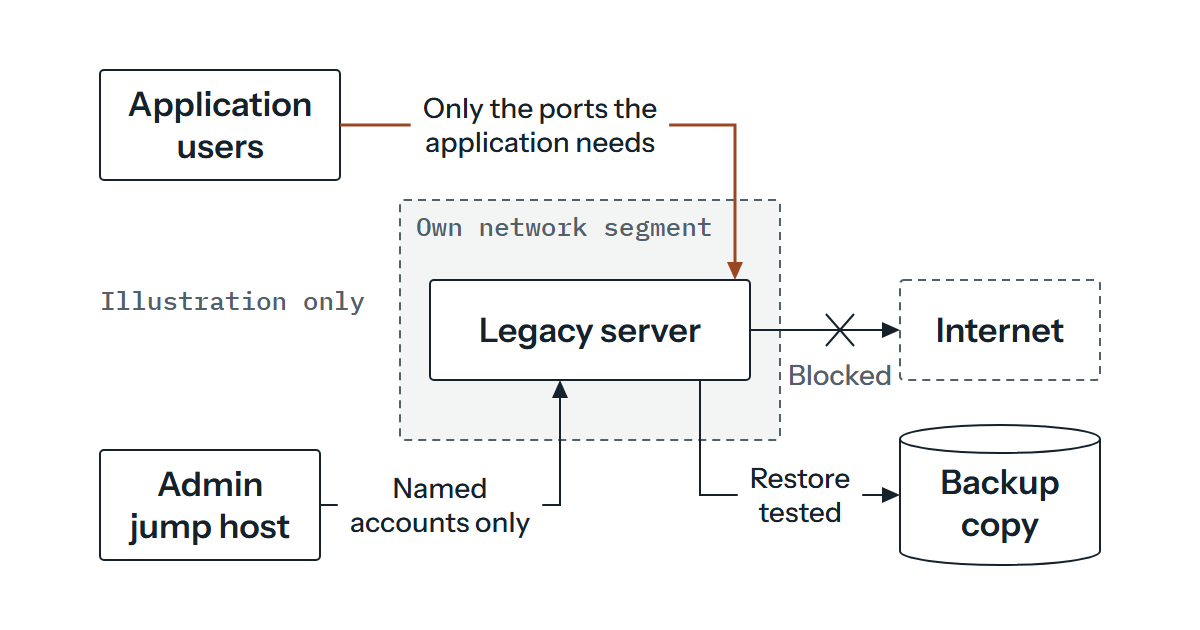
Start with where it sits. Put it in its own network segment and allow inbound connections only from the machines and ports the application needs, which is often a shorter list than the one your firewall allows. Stop it browsing the internet or reading email, and give it outbound access only to what it must reach, such as the Azure endpoints if you use Arc. Then strip it back. Roles, features and software that nobody uses are things an attacker can use, so take them off.
Administrator access deserves the same attention. Use named accounts rather than a shared one, make administration come from a controlled jump host or workstation, and use multifactor authentication on that path where you can. If the application runs under a service account, check it has no more rights than it needs. Check who can sign in as an administrator before you look at anything else, because former staff and old service accounts are easy to overlook.
Keep patching everything around it too. Our post on why updates matter makes the general case, and it applies doubly here. Check as well that your endpoint protection product still supports Windows Server 2012 R2, because vendors set their own support dates. Then make sure someone looks at the logs, since monitoring is how you’d notice a problem on a machine you’ve already accepted is weaker. That kind of ongoing care can be part of our continuing support, which is arranged individually.
Test the backup by restoring it
If the server fails, you may find it’s hard to build another one like it. Install media, the application installer, licence details, service accounts and a note of every odd setting all need to exist somewhere other than the server. Keep a backup copy that the server’s own credentials can’t delete or encrypt, and restore it onto a different machine to see what happens and how long it takes. If the answer is three days and the business can manage one, you’ve learned that while it’s cheap to learn.
The application is the real question
The server is the easy part. The application is harder, and before choosing a route you need to find out what it needs. Ask the supplier in writing which operating systems they support. Then test it: restore your backup into an isolated test machine, put it on a newer version of Windows Server, and write down what breaks. Look for hard-coded paths, drivers, a licence tied to the old hardware and a database it reaches over the network. If the supplier can’t or won’t say what the application supports, an independent test on a newer system is justified, so you’re not depending on their answer.
That test gives you the facts to choose between the realistic routes.
An in-place upgrade keeps the same installation and is the least disruptive on paper. Microsoft’s upgrade overview shows Windows Server 2012 R2 upgrading in place to 2016 or 2019 but not directly to 2022, in steps of up to two versions, and not on a server that boots from a virtual hard disk. Check the lifecycle page of whichever target you pick before you commit, because there’s no point moving into the next problem.
A migration builds a new server on a supported version and moves the application across. It can be cleaner, because you leave the old system’s accumulated oddities behind, but it only works if the application can be installed again. Moving the virtual machine to Azure, as above, is a holding position and nothing more. Putting the old operating system in a virtual machine on a modern host doesn’t change what the operating system is, and a guest still running 2012 R2 still needs its own updates. We’d be wary of containerising an older application unless the supplier can show it works that way, as many older applications rely on installers, services or interfaces that don’t suit it.
If the application is the thing that can’t change, replacing it is sometimes the honest answer, particularly where the supplier has stopped developing it. It’s the slowest option and the one with the largest budget, so look at how you plan for the replacement cost early.
Put dates on the exit
An exit plan is a list of dates with an owner against each. Write down the route you’re leaning towards, the date by which the supplier must answer, a window for the compatibility test, and a target for the cutover. Set the decision date well ahead of the start of Year 2 on 9 October 2024 if the server stays outside Azure, because an extra year is a cost you’d be choosing, not one that happens to you. If you’re enrolling late, remember that waiting adds back-billed months as well (on the Arc route).
Then review the plan on a schedule, because plans for servers like this stall in the gap between “we know we should” and “we have a date”.
When you know the application’s name, the one reason it can’t move and where the server sits on your network, the options above can narrow quickly. If you’d like help weighing those up for your own server, send us those three details and tell us what you’d rather not break.