A shared Wi-Fi password is a blunt tool. Everyone who knows it gets in and it ends up on a whiteboard. When someone leaves, you either change it for the whole building or live with the risk. An unused network socket in a meeting room is much the same: anyone who finds it and has a cable is on your network. If you’ve been asked whether you can stop that, the usual answer is 802.1X with a RADIUS server, which swaps “anyone who knows the password” for a check on who or what the device is, every time it connects.
If you run wired and wireless networks you already know your VLANs and SSIDs. What’s often less clear is how the switch or access point, the directory and the authentication server fit together, and what to settle before you turn it on. The easiest way to see it is to follow a single device as it connects.
What happens when a laptop plugs in
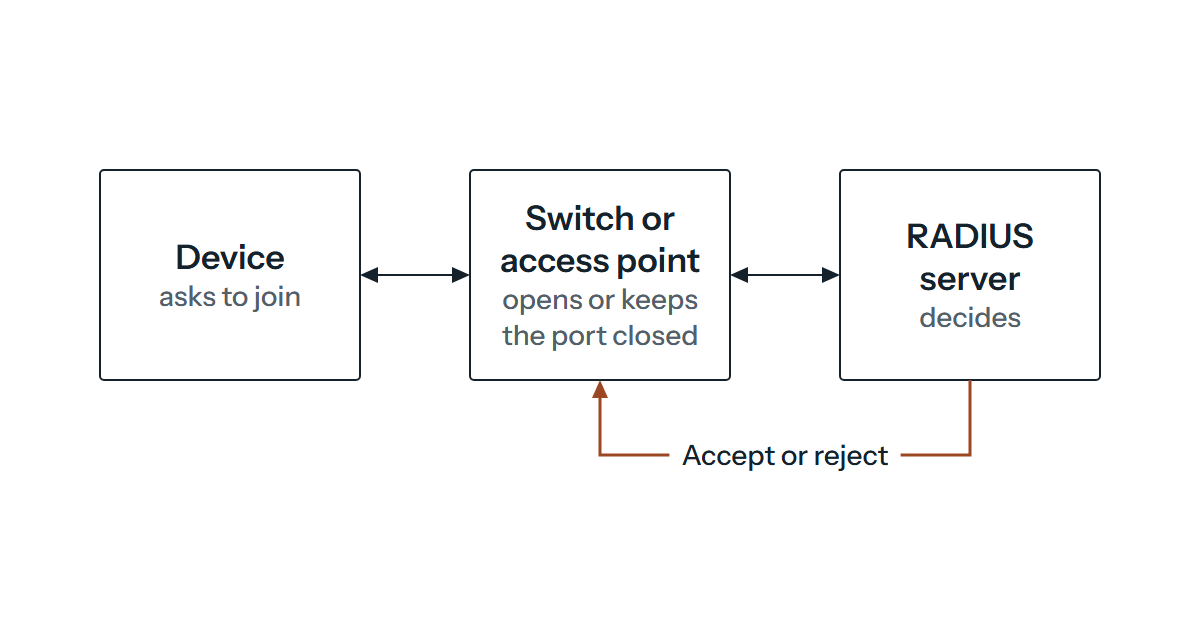
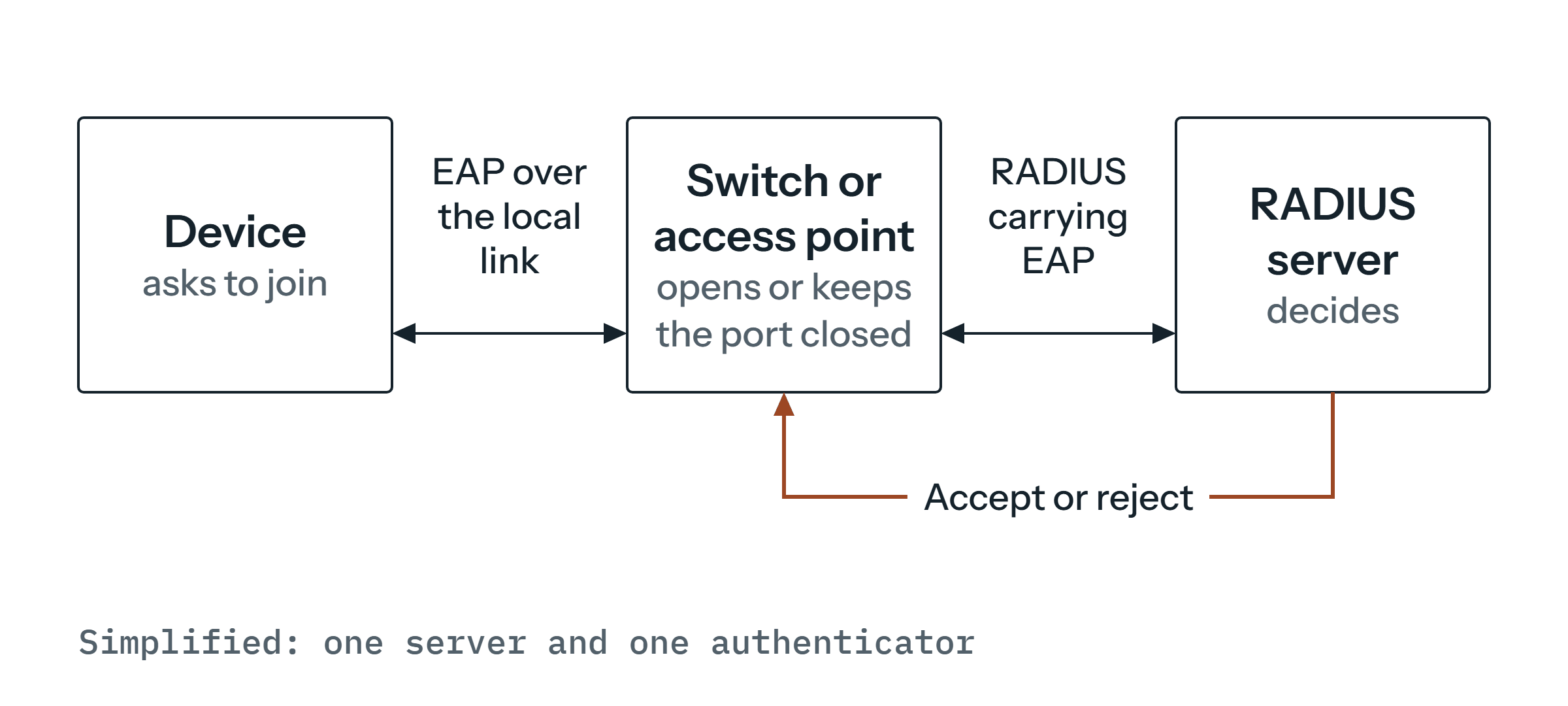
Take a laptop connecting to a switch port that’s been set up for 802.1X. The standard calls the laptop the supplicant, the switch port (or the access point, on Wi-Fi) the authenticator, and the system that checks the credentials the authentication server. RFC 3580, which describes how 802.1X authenticators use RADIUS, defines those terms in the same way, and the standard itself is IEEE 802.1X-2020, “Port-Based Network Access Control”. That edition was published on 28 February 2020 and superseded 802.1X-2010. In essence it lets an administrator restrict the use of LAN ports to secure communication between authenticated and authorised devices.
The part that surprises people is that the switch doesn’t decide anything. It passes the laptop’s request to a RADIUS server and then does what the server says. RADIUS, defined in RFC 2865, is the protocol that carries authentication, authorisation and configuration information between the switch or access point (a network access server, in the RFC’s language) and the server. 802.1X itself doesn’t require a separate server and RFC 3580 notes that RADIUS support is optional for authenticators, so check that your switches and access points offer it.
The conversation about credentials uses EAP, the Extensible Authentication Protocol. RFC 3748 describes it as a framework that supports several authentication methods and typically runs directly over data link layers such as IEEE 802, without needing IP. Between the switch and the server, RADIUS carries those same EAP packets inside EAP-Message attributes (RFC 3579), which is why the switch can pass them along without any code for each method. The method itself lives on the RADIUS server.
What the server says back
The server answers with an Access-Accept, an Access-Reject or, part-way through, an Access-Challenge asking for more (RFC 2865). With EAP the exchange runs back and forth until the server finishes with an Accept or a Reject, and RFC 3579 is clear that a Reject must result in the switch denying access. It’s equally clear about what the switch must not do when the server goes quiet: it mustn’t invent a success or a failure on a timeout, and should end the conversation instead.
An Accept can carry more than a yes. RFC 3580 notes that the server typically indicates a VLAN by including tunnel attributes in the Access-Accept, so the outcome of the login can decide which VLAN a device lands on. Designing those VLANs is a subject of its own, so we’ll leave it there.
One practical point about ports, because it catches people out when they write firewall rules. RADIUS authentication uses UDP port 1812 and accounting (RFC 2866) uses 1813, but both RFCs record that early deployments used 1645 and 1646, so check which pair your equipment expects.
Passwords or certificates
EAP is only the framework, and the method you choose decides what a device has to prove. On a Windows estate it usually comes down to two. The first is PEAP, which wraps EAP inside a TLS tunnel, with Windows supporting EAP-MSCHAP v2 (a username and password) and EAP-TLS as inner methods. The second is EAP-TLS itself, defined in RFC 5216, where the device and the server each present a certificate and so authenticate each other.
Either way, the RADIUS server needs its own certificate. Microsoft’s NPS documentation says that PEAP-MS-CHAP v2, PEAP-TLS and EAP-TLS all require a server certificate that chains to a trusted root certification authority and includes the Server Authentication purpose, and that clients can be set to check it.
Password-based sign-in with PEAP and MS-CHAP v2 suits you if your users and computers already have directory accounts, you’d like the same credentials for network access and logging on, and you can’t yet get a certificate onto every device. The catch is one Microsoft is open about: its EAP documentation warns that MSCHAPv2-based connections are subject to attacks similar to those on NTLMv1. Whatever you choose, make sure clients validate the server certificate. Windows can be set not to ask users to approve unfamiliar servers, so a connection attempt fails if the server name or root certificate isn’t one the client has been told to accept. We’d choose that setting, because a prompt tends to turn a security check into a click.
EAP-TLS suits you if you run a certificate authority, or can set one up, and you can get a client certificate onto every device that needs one. Microsoft’s template instructions assume your own public key infrastructure with Active Directory Certificate Services, and the client certificate has to come from an enterprise CA (or be mapped to an Active Directory account), chain to a trusted root and carry the Client Authentication purpose.
The payoff is that Microsoft describes certificate-based EAP methods as generally the most secure. You can also revoke a lost device’s certificate, provided your RADIUS server checks revocation, which RFC 5216 expects implementations to be capable of because certificates are long-lived assertions of identity. The price is the certificate lifecycle: issuing, renewing and revoking for every device. So before you pick EAP-TLS, ask whether you can run that lifecycle. If you can, it’s the one we’d go for. If you can’t yet, PEAP with strict server validation is a reasonable first step, because a method you can’t maintain can end up weaker in practice than a simpler one you can.
Running the RADIUS side on Windows Server
If you’re on Windows Server, Network Policy Server (NPS) is one way to run the RADIUS side. As at February 2024, Microsoft’s documentation covered Windows Server 2016, 2019 and 2022 and described NPS as its implementation of the RADIUS standard in RFCs 2865 and 2866. NPS can act as the RADIUS server, as a proxy or as both, and it checks accounts against Active Directory Domain Services or the local Security Accounts Manager database. You register your access points and authenticating switches with it as RADIUS clients, and there’s a standard-configuration wizard for a “RADIUS server for 802.1X wireless or wired connections”.
Designing and troubleshooting networks like this is what our network infrastructure page describes. Two limits of NPS are worth knowing before you plan around it. The role isn’t available on a Server Core installation, and if you have more than one Active Directory forest, Microsoft’s page says authentication across forests with EAP-TLS or PEAP-TLS certificates has to go through a RADIUS proxy.
Before you switch it on
These are our recommendations rather than vendor requirements, and we’d settle them before anything goes live.
Think first about what happens when the RADIUS server can’t be reached, because from that moment every connection depends on it. RFC 2865 says a client can forward requests to an alternate server, but it doesn’t specify the retry and fallback algorithms in detail, so plan for more than one server and read your switch or access point vendor’s documentation to see how it behaves.
Then there are the devices that can’t take part. Doing 802.1X needs a supplicant, so list anything that might lack one, such as printers or cameras, check each against its documentation and decide whether to replace it, move it to a separate network or record an exception. Guests shouldn’t need directory accounts either. A separate SSID is one way to handle them, and a VLAN returned in the RADIUS reply is another. For the radio side of Wi-Fi, our wireless networks page covers surveys, access point planning and roaming.
Start small, with one switch port or one test SSID and one test device, before you touch a whole site, and check that a device with no valid credentials is refused as well as that a good one is let in. Keep a way into the switches and the RADIUS server that doesn’t depend on 802.1X, so a policy mistake can’t lock you out of fixing it. Finally, open the firewall for the UDP ports above between each switch or access point and the server. RFC 2865 says a server silently discards requests from a client it has no shared secret for, so register each switch and access point with a shared secret or, on products that allow it, an address range.
If you’re planning 802.1X for a site, or part-way through a rollout and something won’t authenticate, get in touch and we’ll happily look at it with you.