Your backup report is green and the jobs ran last night, but nobody in the building has ever restored all of it onto anything. If a storage array failed on Monday morning, you’d find out on Monday morning what the copies are worth, in what order things need to come back and who is allowed to make the call. A runbook is how you find those answers on a quiet Tuesday in advance instead.
You probably have copies already (the backup basics and common backup mistakes posts cover making them), so the question here is what a recovery would look like. We’ve drawn on the NCSC and on the contingency planning guide from NIST, a US federal body, and the examples are illustrations, not a template for your environment.
Agree what “back” means with the business
Before anything technical, someone outside IT has to say how long each thing can be down and how much work can be lost. Planners call this a business impact analysis, and the acceptable downtime comes from the process owners and business managers, not the person running the servers. Take the method and ignore the federal vocabulary in the guide.
Two numbers come out of that. The recovery time objective (RTO) is how long a system can stay unavailable before the impact becomes unacceptable. The recovery point objective (RPO) is how far back you can go, given your most recent backup, and still call the data good enough. They pull in different directions: the RTO mainly drives how you restore, and the RPO mainly drives how you back up.
Here’s an illustration with made-up numbers. If a finance system backs up at 01:00 and fails at 15:00, you could lose 14 hours of entries, and if the business says it can tolerate losing an hour, a nightly job doesn’t meet the objective however well it runs. The RTO normally has to be shorter than the longest outage the business will accept, because reprocessing data after the outage takes time of its own. The output you want is a ranked list of systems, each with an RTO, an RPO and a named person who agreed them. Include your cloud services, since backing up Microsoft 365 data is a separate decision from backing up the servers.
Restore in dependency order
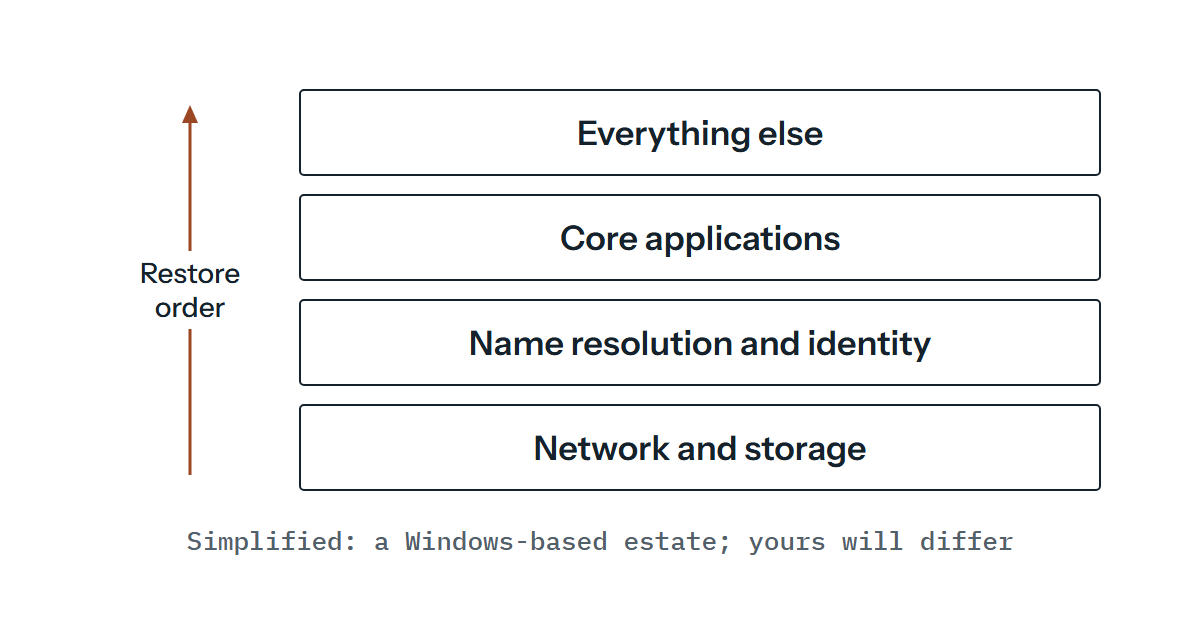
When everything is down it’s tempting to start with what people are shouting about. A sensible rule is to restore the most critical servers before less critical devices such as printers, and to restore an application server’s operating system, and check it, before the application and its data. Beyond that the order is a dependency question, and what follows is for a Windows-based estate, so check it against your own. Microsoft publishes a forest recovery guide for Active Directory that’s worth reading before you write yours.
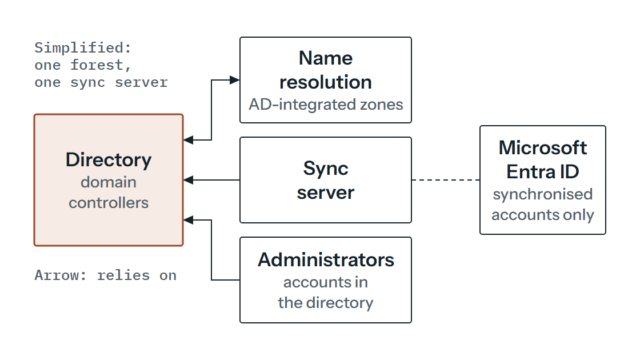
Something has to carry traffic and hold data before anything can be restored at all, so the runbook should say what a minimum viable network and storage look like and where the spare capacity comes from. Name resolution and identity come next, and they depend on each other. So much of an estate finds the rest of it by name, and applications that rely on sign-in can’t start without either. In a Windows domain where DNS zones are stored in Active Directory, which Microsoft’s guide assumes, the two are restored together: its guidance recovers the first domain controller in isolation and has DNS running on that same server. Where DNS runs on separate servers or comes from a service outside the directory, the order can differ. If the directory is unavailable, the people repairing it will need accounts that don’t depend on it, such as local administrator or directory-services restore credentials, so the runbook should say where those are. Only then do the core applications come back, and after them everything that can wait.
That order is a simplification, and your estate will have its own twists. A line-of-business application that authenticates against something outside your directory moves up or down. The useful discipline is to draw the dependencies for each ranked system and write the order from the drawing, not from habit. The question to ask of every item is what has to be working before this one can even be started.
What goes in the document
The text of a runbook matters less than whether a tired person who didn’t write it can follow it. Write the procedures as sequential steps, with escalation points for when an action takes longer than expected. Each step should name the exact backup set, the exact place it lives and what “done” looks like, so nobody has to remember anything.
People matter as much as procedures. The NCSC’s incident management guidance says contact details for key personnel should be readily available, that the people who can authorise critical decisions must be reachable, and that you should consider deputies for when the primary contact isn’t. It says the same applies to suppliers as well as in-house staff. The word readily is doing work there: a contact list stored on the file server you’re restoring isn’t ready at all.
Credentials have the same trap. The accounts and keys you need to start recovering, such as administrator logins, backup encryption keys and the console for your backup tool, should be held somewhere that doesn’t depend on the systems being recovered, with a named deputy who can reach them, and the runbook should say where. A sealed envelope in a safe sounds old-fashioned until the password manager is on the thing that’s down.
Two more parts are easy to leave out. Verification checks say how you’ll know a restore worked, and they should separate data testing (is the recovered data complete and current to the last backup?) from functionality testing (does the system do its job?). And communication says who tells staff, customers and suppliers what, by which route, given that email may be one of the systems down.
Rehearse it in stages
A tabletop exercise comes first and costs a morning. It’s discussion-based, with no equipment deployed: someone presents a scenario, such as the main storage failing overnight, and the people with roles in the runbook talk through what they’d do. A gap you might find is two people each assuming the other has the supplier’s number. Fix those gaps before touching any kit.
Then restore something for real. The NCSC’s advice is to practise restoring files from backups, and after an incident it adds that only clean data should be restored onto clean systems and networks. For anything beyond files, we’d restore to an isolated network, because a recovered copy that boots beside the live system can compete with it for names and addresses, and you don’t want your test to cause an outage. Expect the isolated copy to need its own name resolution and sometimes different addresses, which is part of what you are rehearsing. NIST calls this kind of exercise a functional exercise, and for moderate-impact systems NIST says it should include recovery from backup media.
Time every step, even roughly, because a runbook with no measured durations is a hope. Write down what broke: the missing licence key, the backup that restored but wouldn’t boot, the step that took four hours because the copy was over a slow link. NIST asks for an after-action report with corrective actions captured back into the plan, and that last part is what turns a test into a better document. A layout like this does the job, and the figures are yours to fill in.
| Step | Owner | Target time | Measured time | What broke | Runbook fixed? |
|---|---|---|---|---|---|
| Restore identity and name resolution (first domain controller, with DNS) | (name) | (from RTO) | |||
| Restore further domain controllers | (name) | (from RTO) | |||
| Restore the first core application | (name) | (from RTO) | |||
| Verify data and function | (name) | (from RTO) |
If the measured time exceeds what the business agreed, that’s the finding. It might mean faster storage, a different restore method or a conversation about whether the objective was realistic, and either way the business decides with figures rather than a guess.
How often to repeat
NIST’s sample policy statement has the plan reviewed annually and its recovery capabilities and personnel tested annually, and elsewhere says contact lists need more frequent review than the rest. Treat that as a starting point, not a rule. The real triggers are change: a new system on the ranked list, a change of supplier, a new storage platform, someone leaving who held a role. Rehearse after those as well as on the calendar, and rotate which system gets the full restore so that over a few cycles each one has had its turn.
A final caution on wording. Having a runbook doesn’t mean a system has a tested recovery. A system only has that once it has been restored from backup in the way the runbook describes and within the time the business agreed, and you can say when you last did it. Until then it’s a plan.
Resilience should also be proportionate: a payroll database and a kitchen display screen don’t deserve the same treatment, and no arrangement promises that nothing will ever be interrupted. If nobody in-house has the time to run the rehearsals, or the dependency order is unclear, outside help is justified for the first cycle, and after that the runbook should be yours. Where restore testing is agreed in the scope, it can be part of the ongoing support we arrange individually.
Drawing up the ranked list and the dependency order is the awkward first step, and if you’d like another pair of hands on it, or want to see what a first rehearsal would involve for your systems, you’re welcome to write to us.