A copy activity fails with “cannot connect to SQL Server”, and the first useful question is one the error doesn’t answer: connect from where? The factory you author in doesn’t open the connection. An integration runtime does, and which one decides the firewall, the DNS server, the proxy and the credential that stand between your pipeline and its data.
The runtime is where the work happens
In Microsoft’s integration runtime documentation the runtime is the compute that a pipeline’s activities run on, and the bridge between an activity and the linked service it uses. There are three types, and each reaches different places.
| Type | What it runs | Where the compute is | What it can reach |
|---|---|---|---|
| Azure | Data flows, copies between cloud stores, activity dispatch | Serverless, in Azure | Public endpoints; private endpoints if it sits in a managed virtual network |
| Self-hosted | Copies between a cloud store and a private network store, activity dispatch | A Windows machine you provide | Whatever that machine can route to |
| Azure-SSIS | SQL Server Integration Services packages | A managed cluster of Azure VMs | Public or private networks; on-premises data through a virtual network joined to your network |
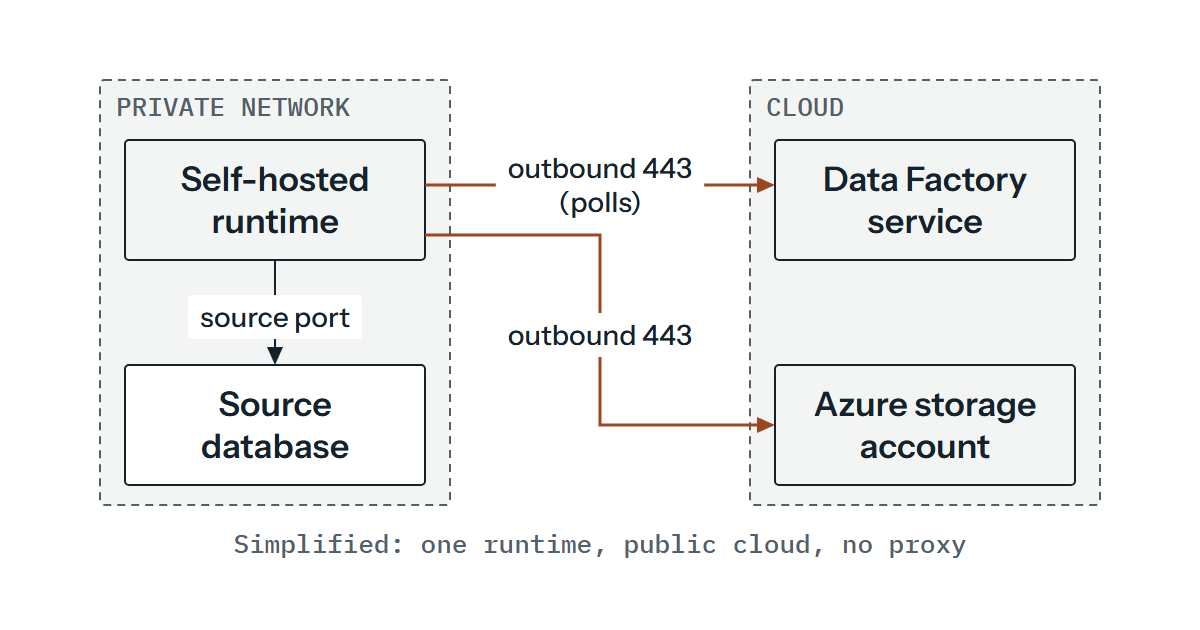
If an activity touches more than one type, the self-hosted runtime wins over a managed virtual network Azure runtime, which wins over the global Azure runtime. A copy between a cloud store and a private store runs on the self-hosted runtime, and a copy between two private stores needs both linked services to point at the same runtime. So the self-hosted machine needs a route to the cloud sink as well as the private source.
Location follows similar rules. By default the Azure runtime auto-resolves: for a copy it makes a best effort to detect the sink’s location and uses the runtime in that region or the closest one in the same geography, and if it can’t detect the region it uses the factory’s. Lookups and authoring operations use the factory’s region. If data must stay inside a geography, the page’s own tip is to create an Azure runtime in that region and point the linked services at it with the connectVia property. A self-hosted runtime has no location property.
What a self-hosted runtime opens, and what it doesn’t
The self-hosted runtime reaches Data Factory the other way round from how some people picture it. Its control channel is a shared Azure Relay connection, the service queues work, and the runtime polls for it. The documentation says it only makes outbound HTTP-based connections, so the documented requirement towards the service is outbound 443, with nothing opened inbound from the internet.
Here is what the self-hosted runtime documentation lists as outbound destinations for the public cloud, as at November 2024. The braces are the page’s own placeholders.
| Destination | Port | What it is for |
|---|---|---|
*.servicebus.windows.net | 443 | Interactive authoring such as test connection and preview data. Not required if self-contained interactive authoring (labelled preview) is enabled |
{datafactory}.{region}.datafactory.azure.net or *.frontend.clouddatahub.net | 443 | Reaching the Data Factory service. The page gives the first form for new factories (the FQDN is in the runtime’s key) and the second for older factories where the key doesn’t show one |
download.microsoft.com | 443 | Updates. Not needed if you disabled auto-update |
| Your Key Vault URL | 443 | Only if credentials are stored there |
*.core.windows.net | 443 | Staged copy through a storage account |
*.database.windows.net | 1433 | Copying to or from Azure SQL Database or Azure Synapse Analytics. Staged copy avoids opening it |
Two details catch people out. Azure Relay has no service tag, so network security group rules use AzureCloud or Internet for it, while the DataFactoryManagement tag covers the Data Factory service. And port 8060 does appear as inbound, but only at the machine level, for the credential manager application. The security page’s FAQ says to open it at the machine level and not on the corporate firewall, and the setup page says that from version 3.3 the installer disables remote access from the intranet by default.
If the Azure Relay endpoint or download.microsoft.com is blocked, the runtime shows a Limited status; the Private Link page says it can still run activities, and only interactive authoring and auto-update stop working. The remote access and the networks a runtime sits on are the part of this we cover under network infrastructure.
Managed virtual network: private reach without a machine of your own
A managed virtual network moves the problem. An Azure runtime provisioned inside the factory’s managed virtual network uses managed private endpoints to connect to supported stores, and Data Factory looks after the network. The page carries no preview label for it.
It’s supported only in the same region as the factory, and an existing global runtime can’t be switched into a managed virtual network or back. Custom DNS isn’t supported. A new managed private endpoint starts in a Pending state, and only an approved one can send traffic, so someone who owns the target resource has to approve it. Microsoft says a managed virtual network together with managed private endpoints protects against data exfiltration, and also that all ports are open for outbound communications through public endpoints. So the protection depends on the private endpoints you create, because traffic to public endpoints isn’t blocked by the network alone.
Two settings change a design decision. A cold compute takes a few minutes to start, so a scheduled copy starts that much later, and a time to live setting keeps compute warm for sequential copies. The DIU you set there is used for all copies and isn’t auto-scaled, and too few for many activities leaves them queued, so size it for your busiest run (2 DIU isn’t supported for Copy in this network). The page also records a general Private Link limitation: you can’t access each resource when both sides are exposed to Private Link and a private endpoint.
Private Link for the factory itself
This is a different feature, and the two get confused. Private Link for Data Factory is about the channel between a self-hosted runtime and the Data Factory service, plus portal access, using the datafactory and portal sub-resources. Disabling public network access applies only to the self-hosted runtime, not to the Azure runtime or the SSIS runtime.
DNS decides whether it works. Creating the endpoint adds a privatelink alias, and resolving the factory’s name from outside the virtual network still returns the public address. A custom DNS server has to resolve the factory’s name to the private endpoint’s address. Two parts of the traffic aren’t covered: interactive authoring through the self-hosted runtime (unless self-contained interactive authoring is enabled, which the page labels preview) and the auto-downloaded new runtime version. So *.servicebus.windows.net and download.microsoft.com still need to be reachable on 443 or the runtime sits at Limited. If you also block public access, keep credentials in Key Vault. And where a proxy sits in the middle, the factory’s endpoint goes on the bypass list in diahost.exe.config and diawp.exe.config, so that traffic to it doesn’t go through the proxy.
Who the data store sees
IP allow-listing works differently for each runtime. All Azure runtimes in a region share address ranges, which you can take from the DataFactory service tag for that region (the IP address page uses DataFactory.AustraliaEast as its example). Data flows and managed virtual network runtimes don’t use those ranges. One exception is Azure Storage: IP rules have no effect on requests from an Azure runtime in the same region as the account, and trusted services are suggested instead, which the data access strategies page limits to managed identity authentication.
A unique static address comes only from a self-hosted runtime, because the Azure runtime is serverless. For some cloud stores, such as Azure SQL Database, the data store’s firewall might need your runtime machine’s address. The security page names five such stores (Azure SQL Database and Azure Synapse Analytics, then Azure Data Lake Store, Azure Cosmos DB and Amazon Redshift) and says some of them might not require it by default.
Credentials, and who can change them
A linked service credential can sit in three places. Data Factory’s own store encrypts it with Microsoft-managed certificates rotated every two years. A self-hosted runtime can hold it locally, encrypted with Windows DPAPI, with a copy on each node. Or the runtime can fetch it from Key Vault, which the self-hosted documentation recommends, partly to avoid credential in-sync problems between nodes. Unless you’ve a reason not to, that’s what we’d use. Recovering a crashed runtime without Key Vault means restoring a backup of the credentials or pushing them to it again.
The Key Vault route relies on the factory’s managed identity and, as the Key Vault page describes, an access policy granting Get and List on secrets. Here is an illustration, trimmed from the documentation’s pattern, of a password field that points at a secret instead of holding one:
"password": {
    "type": "AzureKeyVaultSecret",
    "secretName": "<secret name>",
    "store": {
        "referenceName": "<Azure Key Vault linked service>",
        "type": "LinkedServiceReference"
    }
}
If you leave out secretVersion, the most recent version of the secret is used, so a rotated secret takes effect without editing the factory. Pin the version and it won’t.
On the human side, the roles page says creating and managing linked services and integration runtimes in the portal needs Data Factory Contributor at resource group level or above, with Contributor as a superset. Reader lets someone view and monitor. To let a user test a connection or preview data without wider rights, the page describes a custom role with two actions on the factory, Microsoft.DataFactory/factories/getFeatureValue/read and Microsoft.DataFactory/factories/getDataPlaneAccess/action, assigned on the factory resource. Repository permissions are separate: a Reader with repo access can edit and commit but not publish. Contributor therefore opens a route to whatever the factory’s linked services, credentials and runtimes can reach, so we’d treat that assignment as access to the data estate and not only to a tool, and keep it to the few people who need it.
What a second node covers
You can associate up to four nodes with one self-hosted runtime, in active-active mode, all registered with the same authentication key. Remote access to the intranet has to be enabled on the first node before you add another. The nodes talk to each other on port 8060 (or the port you configured), and the troubleshooting guide shows an Inactive node when that fails, with a name that can’t be resolved as another cause. Its fix is to put the nodes in the same domain or add host file entries. Credential versions must match across nodes, otherwise a failover can leave the new node without the credential it needs. An optional TLS/SSL certificate secures the node-to-node traffic.
A second node protects you from losing a machine. It doesn’t help if both nodes sit behind the same firewall rule, proxy or DNS server, or if the source itself is down. Keeping 8060 closed on the corporate firewall is about who can reach the credential manager, but if your nodes sit in different network segments, we’d expect the firewall between them to need to allow the node-to-node port, and the guide’s Inactive-node steps test exactly that with telnet. The host also mustn’t hibernate, or the runtime goes offline.
Finding the hop that fails
Start with which runtime ran the activity, which the monitoring view shows, then walk outwards. The order and the middle column are our suggestion, and the checks come from the guide unless we say otherwise. They’re all read-only. Changing a proxy setting or a firewall rule is a change, and belongs in your own change process.
| Hop | What failure looks like | Read-only check |
|---|---|---|
| Runtime health | Configuration Manager shows Disconnected or Connecting (the setup page’s firewall and proxy symptoms), or the guide’s “Running (Limited)” or Inactive states | Read the Integration Runtime log under Applications and Services Logs. Limited points at Relay; Inactive points at node-to-node traffic |
| DNS | “Remote name could not be resolved” | From the runtime machine, resolve the service name and, with Private Link, confirm it returns the private address. For node errors, resolve the other nodes’ names |
| Firewall | “An existing connection was forcibly closed by the remote host” | Request the service URL from the runtime machine (below). For port 8060 between nodes, the guide uses telnet to the node’s address and port. We’d apply the same test to the source’s port, and Test-NetConnection is our alternative to telnet on Windows |
| Proxy | Works directly, fails through the proxy | Check whether the runtime is on no proxy, system proxy (the two .config files) or a custom proxy. An NTLM proxy means the service runs under a domain account, so a password change means updating the service settings |
| Certificate | “Could not establish trust relationship for the SSL/TLS secure channel” | Open the service URL in a browser on the runtime machine and view the certificate chain. The guide gives two causes: the root isn’t trusted, or a proxy replaced the certificate |
| Credentials | The connection is made but the login is refused | Which of the three stores holds it? Check Get and List on the vault, a pinned secret version, matching credential versions across nodes |
| The source’s own side | Only some runtimes can connect | Check the data store’s firewall for the runtime machine’s address |
The guide’s connectivity check, shown here as an illustration with a placeholder for the URL (find yours under Nodes, then View Service URLs):
(New-Object System.Net.WebClient).DownloadString("<service URL>")An “existing connection was forcibly closed by the remote host” error that survives all of this can come from a device on the path sending a TCP reset. The guide’s approach is a packet capture and the time-to-live value, to see how far away the sender is.
If you’d like a second opinion on which runtime each of your linked services really uses, and which hop each firewall rule is meant to cover, we’re glad to go through it alongside your engineers. Get in touch and we’ll talk it over.