
An integration can pass its first test with ease. The order goes into one system, shows up in the other, everyone nods and the project closes. Picture finance asking eight months later why twelve invoices are missing, and finding that the connection has been dropping a few records a week since a password changed, with nothing to say so.
That’s the pattern behind many fragile integrations. The happy path was built carefully and everything else was left to luck. What follows is how we’d go about connecting two or more business systems so that the unhappy paths are designed too, using a made-up example to keep it concrete.
Where the fragility comes from
Point-to-point sprawl is the usual starting point. System A talks to B, somebody connects A to C and then C to B, and a year on nobody can say which system depends on which. Each link was reasonable alone, but together a change in one place can break something three hops away.
Underneath that sits hidden coupling, where one system quietly relies on how another happens to behave: the order of columns in a file, a date format, a field that has never been empty until the day it is. Add credentials pasted into scripts, no version on the data format, no named owner and no way to replay what went missing, and it works only while nothing changes. Nobody notices, because nothing in the logs says it has failed.
Choosing how the data travels
Decide the transport before designing anything. Four are common, and the right one depends on what the receiving system can do and what a missed message costs.
| Transport | Suits | Watch for |
|---|---|---|
| File drop (a file written to a shared location and collected) | Batch exchanges, older systems, anything where an hour’s delay is fine | Half-written files, the same file picked up twice, nobody noticing when no file arrives |
| Request to an API | The sender needs an answer straight away | The receiver being down at the wrong moment, and retries causing duplicates |
| Webhook (the sender calls you when something happens) | Near-real-time news from a system you don’t control | Missed calls while you’re unavailable. Check the sender’s documentation for whether it retries and for how long |
| Message queue | Decoupling two systems so either can be slow or offline | Another component to run, own and monitor |
Start with the cheapest option that meets the real requirement. A nightly file is a respectable integration if nobody needs the data sooner, and it’s far easier to inspect and replay than a chain of live calls. Move up the table when the cost of delay or loss justifies the extra machinery.
Following one order through the pipe
Here’s an illustration, not a real system. A web form takes an order, the customer record goes into a CRM and an invoice is raised in an accounting package. Three hops, three chances to fail.
Agree the contract first
Before any code, write down what crosses each boundary: the fields and their types, which are mandatory, what an empty value means and what the receiver sends back for success and for each kind of failure. A one-page contract per interface is enough, and it gives you something to test against.
Put a version on it, in the message or the address of the interface, and have receivers ignore fields they don’t recognise. That lets one side add a field without the other falling over, and it makes a breaking change a deliberate event with a new version and a date by which the old one goes, not a surprise on a Tuesday.
Make repeating an operation safe
Networks fail in an awkward way: you send a request, the connection drops and you don’t know whether it arrived. The only safe response is to try again, which is only safe if repeating the operation does no harm. HTTP has a name for that. RFC 9110 calls a method idempotent if several identical requests have the same intended effect as one, lists PUT and DELETE among them, and says a client should not automatically retry a non-idempotent request unless it knows the semantics are idempotent or can tell the original was never applied.
So for the operation “create invoice for order 10482” we’d give the order a stable identifier, send it with every attempt and have the receiver check whether it has already seen that identifier. Azure Service Bus is a handy example of the same problem. Microsoft’s documentation describes a sender left in doubt when a message is committed but the acknowledgment is lost, and a duplicate detection feature that lets it resend the same message identifier safely. That detection only works over a time window you configure, so we’d also keep our own record of processed identifiers for longer than the window.
Retry with patience
When a call fails, wait, try again and wait longer next time, adding a little randomness so a dozen failed jobs don’t all retry at the same second. Respect what the receiver tells you: RFC 9110 describes a Retry-After header a server can send to say how long to wait before the next request. And stop eventually. For HTTP clients, RFC 9110 says a client should not automatically retry a failed automatic retry, so we’d cap it at a small fixed number of attempts and then park the item, because an endless loop turns one outage into two.
Let a queue absorb the bumps
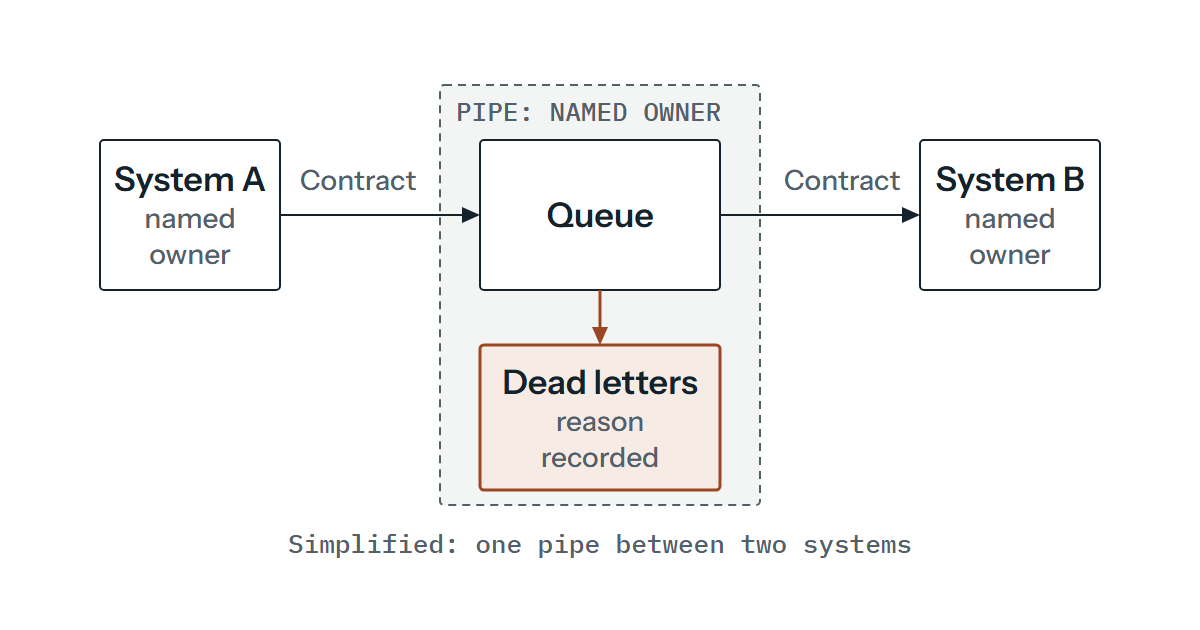
If the accounting package is down for an hour, should the web form stop taking orders? Probably not. A queue between them means the form hands over the order and carries on, and a worker delivers it to accounting when it can. The price is a new moving part, and a new way to lose data if the hand-off to the queue isn’t reliable.
We’d use an outbox here, because it closes that gap: the order and a note to send it are saved together in one database transaction, and a separate process reads the notes and puts them on the queue. A crash then leaves the note behind to be picked up on restart. The receiver may see the same message twice, which is exactly why the previous step matters. Service Bus, for example, redelivers a message when a lock lapses and names the message-id as the usual way to identify duplicate deliveries.
Keep the ones that can’t be processed
Some messages will never succeed however often you retry: an order with a missing customer reference, a field in the wrong format. Park them rather than looping on them or throwing them away. Service Bus has a dead-letter queue for exactly this: messages can be inspected there, an application might resubmit them with an operator’s help, and nothing cleans it up automatically. Whatever you use, the principle is the same: a holding area, a reason recorded against each item and a person who looks at it.
Be able to follow one order
Give each order a correlation identifier when it enters the first system and carry it through every hop and every log line. When finance asks about order 10482, you search for one value and see where it stopped. Without it you’re matching timestamps across three systems by hand.
Noticing when nothing happens
Alerting on errors catches the loud failures. The silent ones, such as an expired credential or a scheduler that stopped, produce no errors at all, so you also need alerts on absence. If no order has reached accounting in a period when some normally would, somebody should hear about it. A daily count of items sent, received and parked, compared with the day before, can find much of what error logs miss, and reconciliation against the source system can catch what’s left.
Credentials belong in a store the organisation controls, not in scripts. Give each integration its own account with only the access it needs, name who owns it and put its expiry date in a shared calendar.
Who owns what, and how to test it
Every interface needs an owner on each side, and the pipe between them needs one too, even if that’s a role and not a person. Write a short runbook for it: what normal looks like, where the logs are, how to replay a failed item, how to pause the flow and who to ring. Keep the code and configuration under version control and inside your backup strategy, since a pipeline nobody can rebuild is a single point of failure. Looking after one over time is the kind of thing that can sit within continuing support, arranged individually, with the scope agreed beforehand.
Test against a staging copy of each system, loaded with made-up data and never pointed at the live accounting package. Deliberately break things: stop the receiver, send the same message twice, send one with a field missing, let a credential expire. If you can’t make the monitoring complain, it isn’t finished.
When a spreadsheet will do
Not everything needs integrating. If two people exchange a few records a week, an export and a paste, done on a set day with a checklist, may cost less to run than any automated route and be easier to understand. Integration pays when volume, frequency or the cost of a mistake makes manual handling the riskier choice. Put a figure on that before building anything, because the answer is sometimes “not yet”. And a file drop is a fine place to start, moving up only when something forces it.
The queue-or-file question is hardest when volumes are modest and nobody is sure what a lost record would cost. If that’s where you are, we’re happy to talk it through before anything gets built.